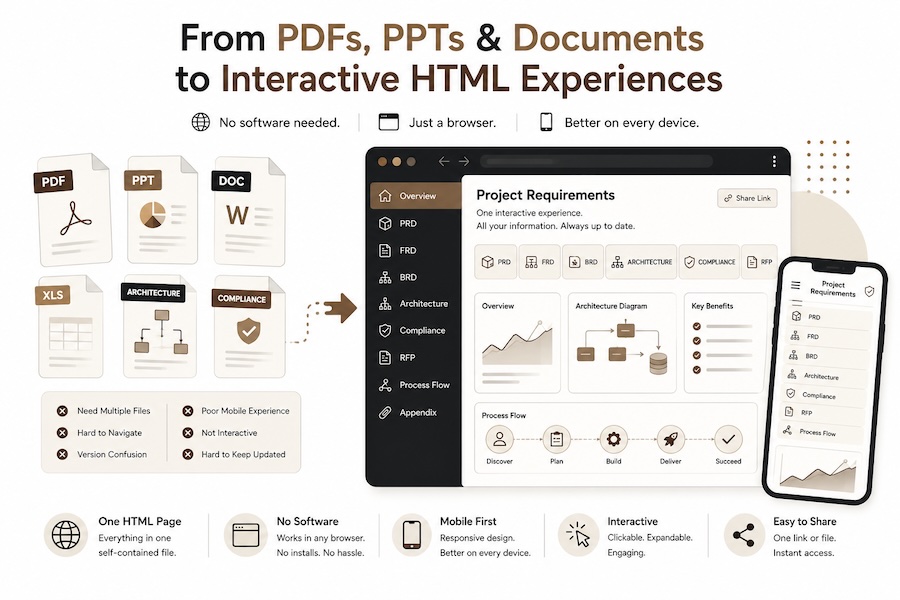
The Death of the Static Document?
Why PDFs, PowerPoints, and Word docs are all being replaced by browser-native HTML — no software required, no compatibility headaches, no excuses.
And the only software you need to open it is a browser.
For decades, enterprise communication followed a familiar pattern. Need to share a requirement? Create a Word document. Need alignment? Prepare a PowerPoint. Need vendor responses? Exchange PDFs.
Need approval?Version_17_Final_v2_Approved_Actually_Final.pptx.
The medium of enterprise thinking has largely remained unchanged for years. But something important is beginning to shift — and it is not just about one format replacing another.
Increasingly, teams are moving away from all static document formats — PDFs, PowerPoints, Word files — and toward interactive, browser-native HTML experiences with embedded content, interactivity, visualizations, and dynamic navigation. No software installations. No licensing. No compatibility layers. Just a browser.
And the reason this is happening right now — not five years ago, not gradually — is one thing.
The Real Accelerant: AI Has Made Everyone a Publisher
“The barrier was never the format. It was the skill required to produce it. AI just removed that barrier entirely.”
On why this shift is happening nowHTML has always been more capable than PDFs, PowerPoints, and Word documents. It has always been interactive, responsive, and universally accessible. So why didn’t this shift happen ten years ago? The technology was there. Browsers were there. The answer is simple: creating HTML used to require a developer.
Writing a well-designed, responsive, interactive HTML document required knowledge of CSS, JavaScript, responsive design patterns, and visual design sensibility. Most product managers, architects, consultants, and business leaders did not have these skills. So they defaulted to what they could produce: Word documents, PowerPoints, and PDFs.
That constraint has now been obliterated.
A product manager opens Claude and says: “Turn this PRD into an interactive HTML experience with expandable sections, architecture diagrams, and a clickable user flow.” Three minutes later, they have a self-contained HTML file they can email to stakeholders.
An architect asks GPT to “Create an interactive system design document with explorable dependency maps and toggle-able detail levels.” It is done before the meeting starts.
A consultant preparing an RFP response generates a polished, mobile-responsive HTML presentation — with embedded ROI calculators and filterable compliance matrices — without writing a single line of code.
Tools like Claude, ChatGPT, and other AI assistants have turned HTML from a developer-only format into a universal publishing medium. Anyone who can describe what they want in natural language can now produce interactive, beautifully designed, responsive HTML documents. The creation skill gap has collapsed overnight.
This is why the shift is happening now — not in 2015, not in 2020, but right now. The format was always superior. What changed is that the means of production became universal.
When the best communication format also becomes the easiest to create, adoption does not follow a gradual curve. It follows a step function. We are on that step right now.
And this creates a compounding effect. As more people produce HTML-based communication, more recipients become comfortable consuming it. As consumption normalizes, expectations shift. Suddenly, receiving a 40-page Word document or a 60-slide PowerPoint starts to feel dated — the way receiving a fax feels today.
To understand why this matters so much, it helps to look at what these traditional formats actually got wrong.
The Problem With Traditional Enterprise Formats — All of Them
PDFs, PPTs, and Word docs were designed for a different era — one where information moved slowly, collaboration was linear, content was mostly read (not interacted with), and updates happened version by version.
But modern work no longer behaves this way.
- Information moved slowly
- Collaboration was linear
- Content was read, not explored
- Decisions in scheduled meetings
- Updates version by version
- Software per format (Office, Acrobat)
- Polished output required design skills
- Fast-moving, cross-functional
- AI-assisted workflows
- Data-connected and distributed
- Continuously changing context
- Real-time decisions and updates
- One browser for everything
- AI creates the document for you
Yet most organizations still try to communicate complex systems using static slides, frozen documents, and rigid PDFs — three formats that each carry their own limitations, and all share a common one: they require specific software to create, edit, and sometimes even view.
A Product Requirement Document in Word has real limits. You scroll. You read. You interpret. You jump across sections. You open separate attachments. And half the context lives elsewhere — Jira, Figma, Slack, dashboards, architecture diagrams, meeting recordings. A strategy deck in PowerPoint forces complex ideas into slide-sized boxes. A compliance response in PDF arrives as a wall of text nobody can interact with.
Documents — regardless of format — become containers of information, but not environments for understanding. The result? Context fragmentation at scale, multiplied across every format and every tool.
The Rise of Interactive Knowledge Artifacts
“The document stops being passive. It becomes interactive. And it opens everywhere.”
On the shift to browser-native experiencesSome forward-looking organizations are beginning to experiment with a different approach. Instead of sending static files — whether PPT, PDF, or DOCX — they share interactive HTML-based experiences.
Imagine this: A PRD is no longer a 40-page Word document. A product roadmap is no longer a 60-slide PowerPoint. An architecture overview is no longer a PDF with static diagrams. Instead, each becomes an interactive web experience where product flows are clickable, architecture diagrams are explorable, metrics update dynamically, and user journeys can be simulated.
A single HTML file. No installs. No Office license. No Acrobat. No compatibility issues. No “latest version” confusion. Dependencies are visualized. Embedded videos explain workflows. AI copilots answer questions about requirements. Sections expand contextually based on user role.
Open it on a laptop. Open it on a phone. Open it on a tablet. It just works — in any browser, on any device, at any screen size. Everything exists in one portable package.
In some ecosystems, teams are already experimenting with this model for requirements, design communication, internal documentation, RFP responses, executive storytelling, and onboarding — replacing PPTs, Word docs, and PDFs with a single, universally accessible format.
The Zero-Software Advantage
Here is something that rarely gets discussed when people compare document formats: the software tax.
Every traditional enterprise format carries a hidden dependency. To properly create, edit, or even reliably view these files, you need specific software installed. And that software comes with licensing costs, IT overhead, version compatibility issues, and device constraints.
HTML eliminates this entire layer. There is no software to buy, no compatibility matrix to worry about, no “it looked different on my machine” problem. A self-contained HTML file carries its own styling, its own interactivity, and its own logic. The browser is the only runtime it needs.
And here is what makes this even more practical: HTML files distribute exactly the same way traditional documents do. Attach one to an email. Drop it in a Slack channel. Save it to a shared drive. Send it over WhatsApp. The sharing workflow does not change — only the experience on the other end does.
A self-contained HTML file is just a file. It lives offline. It opens without an internet connection. It does not phone home to a server. It does not require a SaaS login. You can copy it to a USB drive and hand it to someone, and it will work exactly as intended when they double-click it in any browser. Try doing that with a cloud-native document or a collaborative slide deck.
The distribution model of HTML is identical to PDF — email it, share it, store it offline — but the consumption experience is incomparably richer. It is the portability of a document with the power of a website.
For globally distributed teams, contractors, vendor ecosystems, and client-facing communication, this is not a minor detail. It is a fundamental accessibility and distribution advantage.
Mobile-First by Default — Not as an Afterthought
Consider how much enterprise communication is now consumed on mobile. Executives review strategy decks on their phones during commutes. Product managers scan PRDs between meetings on tablets. Vendors open RFP responses on whatever device is at hand.
Now consider the mobile experience of traditional formats.
PowerPoint on a phone is painful — slides designed for widescreen projectors get squeezed into a 6-inch display. Word documents on mobile require constant pinching and zooming. PDFs on smaller screens are an exercise in frustration, with text too small to read and layouts that refuse to reflow.
HTML is inherently responsive. Built correctly, it reflows to any screen size, adjusts typography for readability, and adapts navigation for touch. The same artifact that fills a 27-inch monitor works beautifully on a phone — without a separate “mobile version.”
This is not about making things look pretty on mobile. It is about making enterprise knowledge accessible wherever decisions happen — and increasingly, decisions happen on mobile devices, in transit, between meetings, on the go.
Why HTML Is Quietly Replacing Every Enterprise Format
At first glance, using HTML instead of PDFs, PPTs, and Word docs may seem like a formatting preference. It is not. It represents a deeper shift — one with compounding advantages beyond zero-software and mobile readiness.
1. HTML Has Fewer Boundaries Than Any Document Format
PowerPoint imposes slide constraints. Word imposes page constraints. PDF imposes reading constraints. HTML imposes almost none.
Infinite layouts with asymmetry, overlap, and diagonal flow
Clickable flows, expandable sections, dynamic navigation
Embedded simulations and animated workflows using SVG + JS
Scroll narratives that reveal complexity progressively
HTML gives teams the freedom to communicate ideas the way they actually think. Not the way slides, pages, or fixed layouts force them to think.
2. Complex Systems Need Better Storytelling
Modern systems are complex. Cloud architecture. AI workflows. Multi-agent orchestration. Data pipelines. Security layers. Compliance requirements. Try explaining all of this in static slides and you end up with crowded diagrams and endless appendix slides nobody fully understands. Try it in a Word document and you get 80 pages of text that gets skimmed at best.
Interactive experiences solve this through progressive disclosure. Want a high-level summary? You get one. Want technical depth? Expand the section. Want architecture details? Click deeper. The same artifact serves executives, architects, engineers, vendors, and operators — on any device, without any software. That is incredibly powerful.
3. AI Works Better With Structured, Interactive Content
This is perhaps the biggest shift people underestimate. When requirements exist as structured HTML with semantic organization, metadata, embedded relationships, and connected context, they become far more AI-readable than disconnected PDFs, siloed slide decks, or heavily formatted Word files.
Imagine asking: “Show me dependencies impacted if we change the authentication flow.” Or: “Generate test scenarios from these requirements.” When knowledge becomes structured and interactive, AI becomes dramatically more useful — and HTML is the natural format for that structure.
The future is not simply documents humans read. It is knowledge systems humans and AI collaborate on — and those systems need a format that is open, structured, and universally accessible without proprietary tools.
Even RFPs and Vendor Communication Are Changing
Traditionally, RFP responses have been static documents — long PDFs, heavy PowerPoints, generic Word templates. But vendors increasingly need to demonstrate technical capability, architecture thinking, product maturity, and integration depth.
Interactive HTML experiences are far better suited for this. Imagine receiving an RFP response where:
Diagrams are interactive and explorable, not static images pasted into slides
Compliance mappings are searchable and filterable — not buried in appendix pages
ROI simulations are embedded and adjustable in real time
Evaluators open it on any device — phone, tablet, laptop — with zero installs
Suddenly, enterprise communication becomes more persuasive, more transparent, and easier to evaluate — anywhere, on anything. The experience itself communicates maturity.
This is bigger than a format change.
It is the end of the software dependency for communication.
A transition from documents to interfaces.
From installed tools — to the universal browser.
From developer-only publishing — to everyone publishes.
From reading — to exploring.
The Skills That Will Matter
This shift also changes expectations from teams — though perhaps not in the way you might expect. Tomorrow’s product managers, architects, consultants, and engineering leaders do not need to learn HTML. They need to learn how to think in terms of information experiences — and then use AI tools to bring those experiences to life.
Communication itself is becoming a product design problem — and AI is the production tool.
These may become surprisingly important leadership skills — not just technical ones.
Final Thought
What happens when communication itself
becomes software?
The most interesting question is not whether HTML replaces PDFs, PowerPoints, or Word documents individually. It is what happens when all of them are replaced by a single, universally accessible, interactive format — one that needs nothing more than a browser, distributes as easily as an email attachment, works offline, and can now be created by anyone with access to an AI assistant.
When requirements can be explored. When architecture can be interacted with. When documents become intelligent. When any stakeholder on any device can engage deeply — without installing anything, without licensing anything, without losing formatting or fidelity. And when the person who created all of this is not a developer, but a product manager who typed a prompt during their morning coffee.
The organizations that embrace this shift early may not just communicate better. They may actually think better.
Because sometimes, the tools we use to express ideas quietly reshape how ideas themselves are formed. And when those tools become universal, the ideas can finally reach everyone.